


Monarch: Budget & Track Money
4.82.32K Reviews
App Specs
- Version
- 2.0.112
- Updated On
- License
- Free
- Downloads
- 500,000+
- Developer
- Monarch Money
- Categories
- Finance
- Platform
- Android
Screenshots



 Analysis by AppCompare
I approached Monarch: Budget & Track Money as a first-time user who wants a clearer view of everyday finances, not another project to maintain. It is a finance app from Monarch Money, and its appeal is the chance to bring spending, balances, and financial goals into one place. The first useful result is not a perfect budget; it is being able to see what is happening and decide what deserves attention next.
Getting from setup to a useful money picture
I’d use the first overview to answer one practical question rather than trying to understand every number at once. In this section, I’ll focus on how to turn the initial setup into a useful snapshot, including what to check before relying on it. From there, the next step is making that picture helpful in everyday decisions.
What to expect when you open it
When you first open Monarch, you’re greeted with a sleek and intuitive interface that doesn’t overwhelm with a barrage of numbers and charts. It’s like the app has a calming effect on my usual money-related anxiety. The design is minimalistic yet functional, which makes navigating through the features a breeze. You don’t have to be a finance guru to get started, and that’s a win right there.
The app is free to install, with in-app purchases listed from $14.99 to $99.99 per item. That distinction matters: I would treat installation as a chance to explore, not assume every part of the experience is free. Monarch has a 4.7 average from around 19,000 ratings, and it has been installed over 500,000 times. Those figures suggest that plenty of people use it, but they don’t tell you whether its approach will suit your finances, so I’d judge it by how well its overview fits your routine.
Monarch is rated for Everyone, and its current version is 2.0.76, with Android support beginning at 7.0. It was released on January 21, 2021. The practical takeaway for a new user is simple: check that your device meets the operating-system requirement, then allow yourself time to learn the layout rather than expecting a complete financial plan on the first screen.
Setting up accounts without expecting instant perfection
The first step is linking your financial accounts, and Monarch makes this super straightforward. They’ve partnered with major banks and credit institutions, so chances are your bank is on the list. The process is secure and quick, and before you know it, you’re ready to roll. Having all your accounts in one place is like having a personal financial dashboard in your pocket.
For a first session, I’d connect only the accounts that help answer a specific question: perhaps where your regular spending goes, or how your cash and investments fit together. Then review the resulting picture before acting on it. A budgeting app is most helpful when the information it presents reflects your real situation, and initial account labels or imported transactions can need a human check. If something looks out of place, correcting your understanding before setting targets is better than building a plan around a misleading category.
Worth Reading Before You Choose

EA SPORTS FC Mobile 26 Is a Bigger Football Game, but It Takes Time

Flipboard Shows What News Apps Must Do Beyond the Feed

Switching to Android Auto Means Rethinking Your Driving Routine

Google Calendar Makes a Crowded Week Easier to Manage

Ludo King Makes the Most of the Minutes Between Plans

Baby Panda World Brings Quick Play to Modern Phones, but Its Game Library Feels Busy
There is also a useful trade-off in putting several accounts together. It saves the effort of jumping between bank apps, but it makes the quality of your overview depend on the accounts you choose to include and how clearly you can interpret what appears. If you prefer to keep accounts separate, or simply want to record a few purchases by hand, a lightweight spreadsheet or your bank’s own app may feel more comfortable. Monarch makes more sense when a consolidated view is worth the setup.
Make the first budget useful, not ambitious
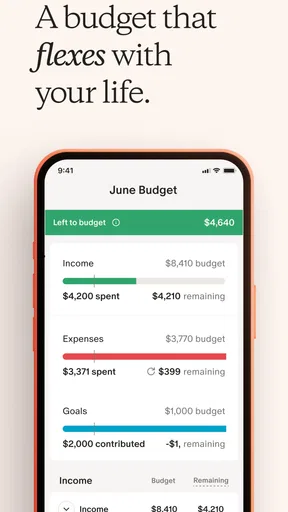
Budgeting is where Monarch truly shines. The app allows you to set up budgets based on your spending habits. It’s flexible, so you can adjust your budgets as your financial situation changes. I love how it categorizes expenses, making it easier for me to see where my money is going. The app even offers insights and suggestions, which are perfect for someone like me who occasionally needs a nudge in the right direction.
My advice is to begin with a few categories that regularly affect your choices instead of trying to plan every dollar immediately. For example, if you are unsure why your account seems to run low before payday, look first at recurring bills and the kinds of flexible purchases that tend to build up. Once the broad pattern is clear, a budget can give those areas more structure. This is a more forgiving way to start than setting strict limits everywhere and feeling that you have failed when real life changes them.
A realistic routine might be to check the app after a grocery trip, notice how that spending fits the month, and decide whether you want to adjust another discretionary area. The useful action is not judging yourself over one purchase; it is making a small decision while there is still time to change course. Someone with irregular income may need to revisit plans more often than someone with a predictable paycheck, while a user who wants only a fixed monthly allowance may prefer a simpler budgeting tool.
Use spending history to spot patterns
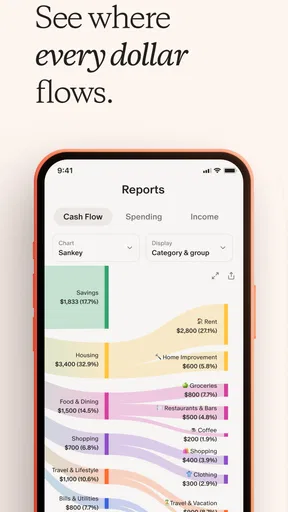
Tracking expenses can be tedious, but Monarch does the heavy lifting for you. It automatically categorizes transactions and gives you a clear picture of your spending habits. The visual breakdowns are particularly helpful, making it easy to spot those sneaky, unnecessary expenses. Plus, the app sends notifications to keep you updated, which is like having a mini financial advisor in your pocket.
The non-obvious benefit of reviewing a category over time is that it can expose a habit rather than a single “bad” purchase. If takeout, small subscriptions, or convenience spending seems high, I’d inspect the pattern and ask whether it matches my priorities before cutting anything. A category label is a starting point for a decision, not a verdict. That distinction keeps the app useful without turning every notification into pressure to spend less.
For the first week, I’d check a few transactions that matter and use them to learn how Monarch represents your spending. If a purchase appears in a category that does not help you think clearly, treat that as a reason to review your budget assumptions. The practical question is whether the app helps you make a better next choice—not whether every chart looks tidy.
Choose a goal that gives the numbers a purpose
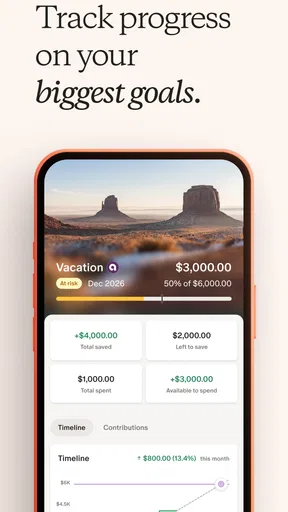
One of my favorite features is the goal-setting tool. Whether it’s saving for a vacation or paying off debt, Monarch helps you set realistic goals and track your progress. The app provides a timeline and suggests ways to reach your targets faster. Watching the progress bar fill up as you inch closer to your goal is surprisingly satisfying. It’s like having a cheerleader for your financial aspirations.
I’d start with one goal that has a clear reason behind it, such as building a travel fund or directing extra money toward debt. A single target makes it easier to connect day-to-day choices with something you care about. If you have several competing goals, decide which one matters most right now instead of splitting attention so widely that none feels meaningful. A progress display can encourage consistency, but it cannot decide which priority is right for you.
This is also where expectations matter. Monarch can help you organize and monitor your plans, but it is not a substitute for deciding what you can comfortably afford or for professional financial advice when your situation calls for it. I would use its tracking to stay oriented, then make consequential decisions with the full context of bills, income, and upcoming commitments in mind.
Privacy, trust, and the account-linking choice
I know some of you might be concerned about security, and rightly so. Monarch uses top-notch encryption and adheres to strict privacy policies to ensure your data is safe. It’s reassuring to know that they take security seriously, allowing you to focus on managing your money without worrying about your information being compromised.
Even when an app takes security seriously, linking financial accounts is a personal comfort decision. If that step gives you pause, consider whether the convenience of seeing your finances together is worth it to you before proceeding. You can also begin by exploring the interface and deciding what role you want the app to play, rather than feeling obliged to connect everything at once. I would not link accounts merely because a setup screen encourages it; the point is to make your own money routine easier.
Who benefits most, and when another approach is better
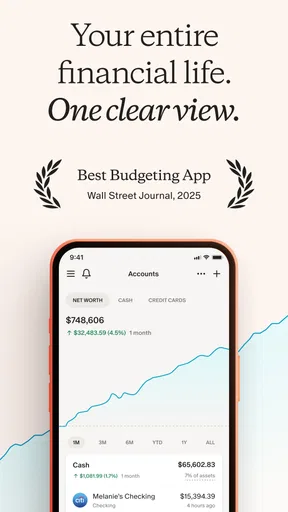
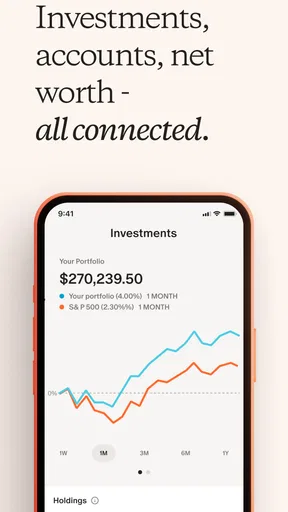
I think Monarch is best for someone who wants one place to review spending, track net worth and investments, and keep financial goals visible. It can be especially useful if you currently move between separate banking and investment apps and find that the switching makes it hard to see the bigger picture. The broad view can help you ask better questions about where money is going and what you want it to do next.
Compared with using a bank’s built-in spending summaries, Monarch’s broader purpose is to bring more of your financial picture together rather than focus on one institution’s transactions. Compared with a spreadsheet, it offers a more guided, visual experience, while a spreadsheet gives you direct control over how information is organized. Neither alternative is automatically better: a spreadsheet may suit someone who enjoys manual planning, and a bank app may be enough for someone who only wants to check one account. Monarch’s value depends on whether its wider overview saves you effort.
I would skip it if you want a bare-bones expense log, dislike connecting accounts, or are unlikely to open a finance app regularly. A detailed dashboard only helps if you use it to make decisions. If you find yourself checking numbers repeatedly without changing a plan, a simpler monthly review could be healthier and more effective than adding another layer of tracking.
Final thoughts
After spending some quality time with Monarch: Budget & Track Money, I can safely say it’s a game-changer for anyone looking to take control of their finances. The app is user-friendly, comprehensive, and, above all, effective. It’s like having a financial advisor, a budgeting tool, and a goal tracker all rolled into one.
Whether you’re a budgeting newbie or a seasoned pro, Monarch offers something for everyone. It’s not just about numbers and charts; it’s about empowering you to make informed financial decisions. So, if you’re on the fence about giving it a try, take the plunge. Your future self will thank you.
My more measured recommendation is to start with one concrete question—where is my money going, what can I set aside, or how are my accounts changing? Set up only what helps answer it, review the first picture with care, and choose one small next action. If Monarch turns that into a routine you can sustain, it earns its place on your phone; if the extra detail feels like work, a simpler method is a perfectly sensible choice.
Pros
- Intuitive and user-friendly interface.
- Comprehensive financial tracking tools.
- Customizable budgeting categories.
- Real-time updates and alerts.
- Secure with bank-level encryption.
Cons
- Limited free version features.
- No cryptocurrency tracking.
- Occasional sync delays.
- Requires bank account linking.
- No desktop version available.
FAQs for Monarch: Budget & Track Money
What features does Monarch: Budget & Track Money offer?
Monarch offers a comprehensive suite of features designed to help users manage their finances effectively. It includes budgeting tools, expense tracking, personalized financial insights, and goal setting. Users can link their bank accounts for real-time updates and receive alerts on spending patterns. It also provides collaborative options for couples or families managing finances together.
Is Monarch: Budget & Track Money secure?
Yes, Monarch prioritizes user security by implementing bank-level encryption and two-factor authentication. The app ensures that your financial data is protected and remains confidential. Regular security updates and compliance with industry standards further enhance the safety and integrity of your information.
Can I use Monarch offline?
Monarch is primarily designed for online use to provide real-time financial tracking and updates. However, users can still access previously synced data when offline. Once reconnected, the app will update any changes made during the offline period to ensure data consistency and accuracy.
How does Monarch help in achieving financial goals?
Monarch enables users to set personalized financial goals, such as saving for a vacation or paying off debt. The app provides visual progress tracking, personalized insights, and actionable steps to help users stay on track. It also offers reminders and motivational tips to keep users engaged and committed to their goals.
Is Monarch suitable for beginners in budgeting?
Absolutely. Monarch is designed with user-friendliness in mind, making it suitable for budgeting novices and experts alike. The app offers intuitive navigation, easy-to-understand financial insights, and helpful tutorials. Beginners will find it easy to set budgets, track expenses, and gain a better understanding of their financial health.


